

A CRM should not feel like a storage box where customer numbers are kept and forgotten. A good CRM should work like an operating system for the sales team. TDO CRM is designed around that idea: every lead, call, duplicate check, follow-up, dashboard signal, and report should help the business take faster and better decisions.
This guide explains how TDO CRM works internally, step by step. If you are trying to understand the system before using it for your sales or calling team, this article will show how the dashboard, leads, duplicates, calls, follow-ups, and reports connect with each other.
The TDO CRM process in simple words
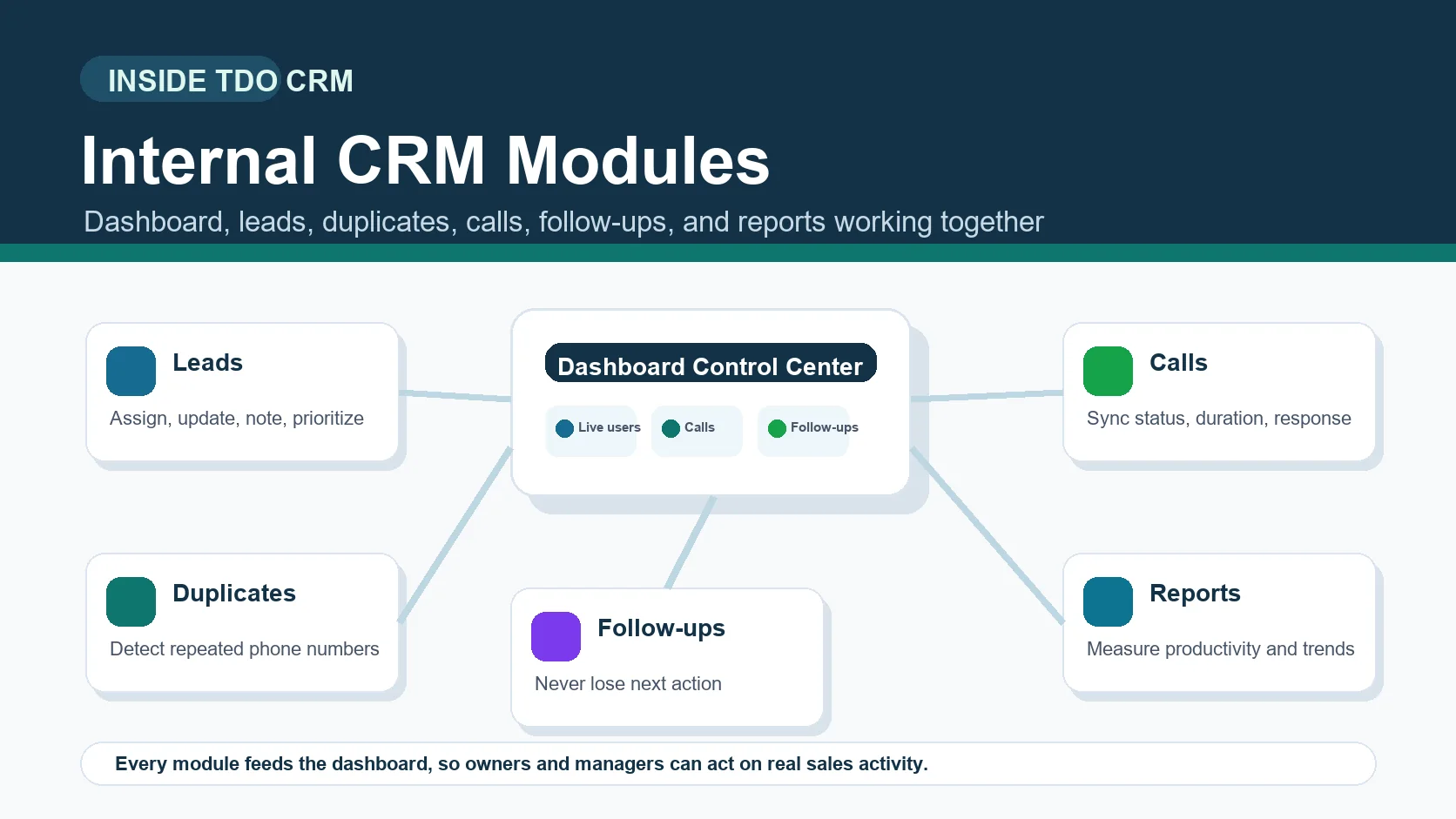
TDO CRM starts from lead capture and ends with measurable team performance. A lead enters the system, gets assigned to the right user, passes through duplicate checks, receives calls and follow-ups, and finally becomes part of reports that managers can use for coaching and decision-making.
- Lead data enters the CRM with customer name, phone number, source, owner, status, and notes.
- The dashboard shows live business activity so managers can understand what is happening right now.
- Duplicate checks help detect repeated phone numbers before multiple users contact the same customer.
- Call tracking records incoming, outgoing, missed, no-answer, busy, and connected calls.
- Follow-ups keep next actions visible so hot leads are not lost.
- Reports convert raw calling activity into practical performance insights.
How the TDO CRM dashboard works
The dashboard is the control center of TDO CRM. Instead of opening different sheets, call logs, and chat updates, managers can use the dashboard to understand the current condition of the team and the lead pipeline.
- It shows important sales activity in one place.
- It helps managers review calls, connected users, idle users, and pending work.
- It gives owners a quick view of whether the team is active or only logged in.
- It supports faster decision-making because the data is visible without waiting for manual reports.
For a calling team, the dashboard is not only a visual screen. It is the place where daily discipline becomes visible. If calls are low, follow-ups are pending, or users are idle, managers can identify the issue early.
How leads work inside TDO CRM
The leads module is where customer opportunities are organized. Every lead should have context: who owns it, where it came from, what the customer said, what the current status is, and what should happen next. TDO CRM keeps these details structured so executives do not call blindly.
- Lead ownership helps managers know which executive is responsible.
- Lead status helps the team understand whether a customer is new, interested, pending, converted, or not reachable.
- Lead notes help preserve customer conversation history.
- Lead source helps owners understand which campaign or channel is bringing useful inquiries.
- Lead priority helps the team focus on high-value or urgent customers first.
How duplicate lead detection works
Duplicate leads are a silent sales problem. When the same phone number is entered multiple times, two users may call the same customer, managers may see inflated lead counts, and the customer may feel confused or irritated. TDO CRM helps reduce this problem by identifying repeated customer records.
- It helps detect repeated numbers before the team wastes calling effort.
- It supports cleaner lead ownership because one customer should not be handled by multiple users without clarity.
- It improves reporting accuracy because duplicate records can distort conversion numbers.
- It creates a smoother customer experience by reducing repeated and unnecessary calls.
How call tracking works in TDO CRM
TDO CRM is built as a call-first CRM, so call activity is central to the workflow. When the mobile app and calling flow are configured correctly, the CRM can connect calling activity with the lead record and help managers understand real sales effort.
- Incoming calls can show customer response and interest.
- Outgoing calls show active sales effort from executives.
- Missed calls and no-answer calls help managers find follow-up gaps.
- Connected calls and talk time help evaluate conversation quality.
- Call history gives the next executive or manager better customer context.
The main value of call tracking is not just counting calls. The real value is connecting call status, duration, customer response, and next action with the lead. That is how managers can coach the team and improve conversion quality.
How follow-ups keep sales opportunities alive
Many sales opportunities are lost because the customer was interested but nobody followed up on time. TDO CRM helps avoid that by making next actions visible. A follow-up is not just a reminder; it is a sales commitment that should be visible to the executive and manager.
- The executive speaks with the customer and updates the lead context.
- If the customer needs time, the next follow-up is created.
- The manager can review pending follow-ups and delayed actions.
- Hot leads stay visible instead of disappearing inside chats or memory.
How reports turn activity into decisions
Reports are where the CRM becomes a management tool. Raw activity such as calls, talk time, missed calls, idle users, connected ratios, and follow-up completion becomes useful only when managers can review it clearly. TDO CRM reports help owners and team leaders identify what is working and where the sales process needs improvement.
What managers get from this system
The biggest benefit of TDO CRM is visibility. Managers do not have to depend only on verbal updates, screenshots, or end-of-day messages. They can review activity patterns and guide the team with data.
- Clear lead ownership and accountability.
- Better understanding of connected calls and missed opportunities.
- Faster detection of duplicate leads and confused customer handling.
- Improved follow-up discipline for warm and hot leads.
- Better coaching because reports show where each user needs support.
Simple implementation checklist
- Import or create clean lead records with phone number, source, owner, and status.
- Train executives to update lead notes and follow-up actions after calls.
- Use duplicate checks before assigning large lead batches.
- Review the dashboard daily to understand active work and pending issues.
- Use reports weekly for coaching, not only for pressure.
Frequently asked questions
How does TDO CRM work for sales teams?
TDO CRM connects lead management, duplicate checks, call tracking, follow-ups, dashboard monitoring, and reports so sales teams can work with more visibility and accountability.
Which TDO CRM module should managers check first?
Managers should start with the dashboard because it gives a quick view of live activity, calls, users, pending work, and key sales signals.
Why is duplicate detection important in CRM?
Duplicate detection helps reduce repeated calling, customer confusion, inaccurate lead counts, and wasted sales effort.
Does TDO CRM only track calls?
No. Call tracking is a core strength, but TDO CRM also manages leads, follow-ups, duplicate checks, team monitoring, reports, WhatsApp-related activity, and performance insights.
Build a visible sales process with TDO CRM.
TDO CRM helps owners and managers understand how every lead, call, duplicate check, follow-up, and report works together inside one call-first CRM system.
Request Demo